
How do I create a new bot?
Click the + button at the top of the bot list, give the bot a name, say what it does and click Create bot. Each bot gets its own instructions, memory, folder and scheduled tasks.
Create a bot
- Click + (New bot) at the top of the bot list, next to the search button.
- In Name, type a name, for example “Scout”. Up to 40 characters.
- In What does it do?, describe its job in one line, for example “Watches competitors and tells me what changed”.
- Click Create bot, or press Enter.
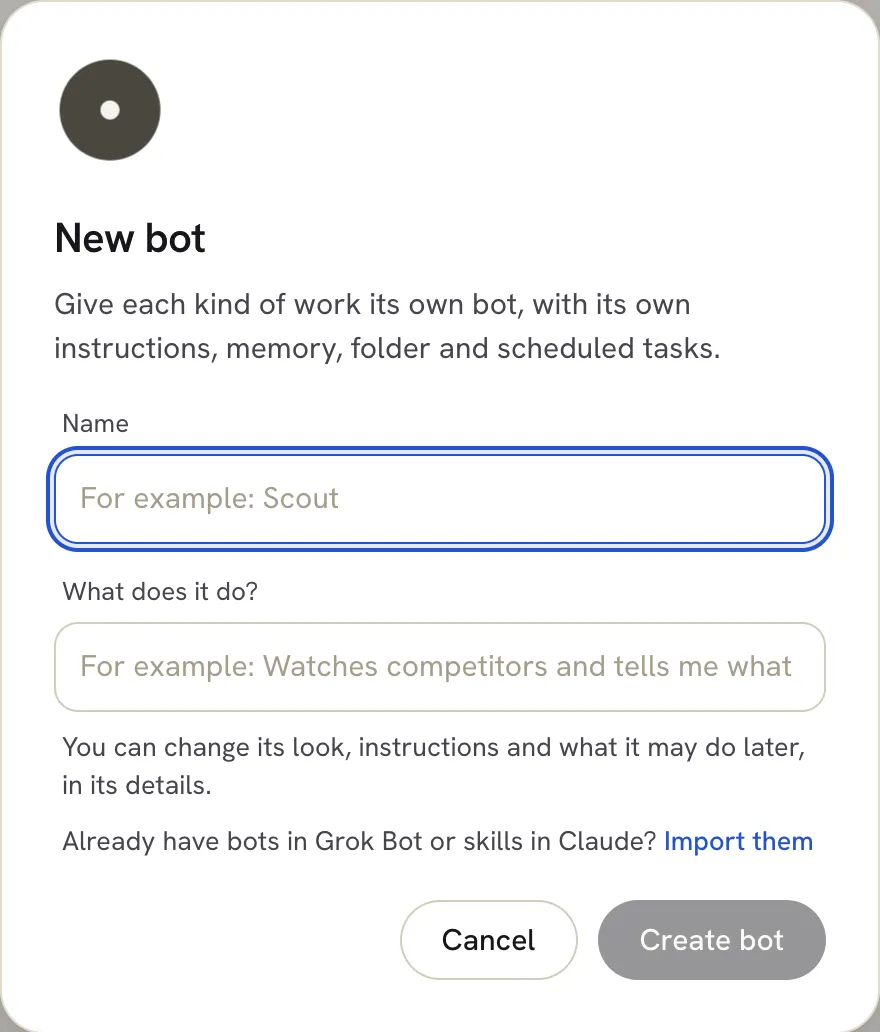 The new bot appears in your bot list. Click it to start chatting and tell it more about how you want the work done.
Change it later
You can change the bot’s name, job, instructions and what it may do at any time in its details. See Change a bot’s details and files.
Other ways to get bots
- Import them. Already have bots in Grok Bot or skills in Claude? Click Import them in the New bot dialog. See Import bots from Claude Code, Codex and Grok.
- Install a ready-made bot from the Marketplace. See Install a bot from the Marketplace.
Troubleshooting
- Create bot is greyed out. Type a name first.
Related articles
Did this answer your question?
Thanks for letting us know.Thanks, we will improve this article. Want a hand right now?
Still need help?
Chat with us and get an answer in a few minutes.