
How do I connect Claude Desktop or Claude Code to Locul?
Open Settings, Connected apps, and click Connect next to Claude Desktop or Claude Code. Restart Claude Desktop if it was open.
On this page
Click Connect apps at the bottom of the left rail, then click Connect next to Claude Desktop or Claude Code. Locul sets them up on this computer, so Claude can recall and save your memories.
Connect
- Click Connect apps at the bottom of the left rail. This opens Settings > Connected apps.
- Scroll to Use Locul memory in your AI apps.
- Next to Claude Desktop or Claude Code, click Connect.
- For Claude Desktop, quit and reopen it if it was already open.
When it works, you see a message that the app connected and how many tools it found. The row then shows Connected.
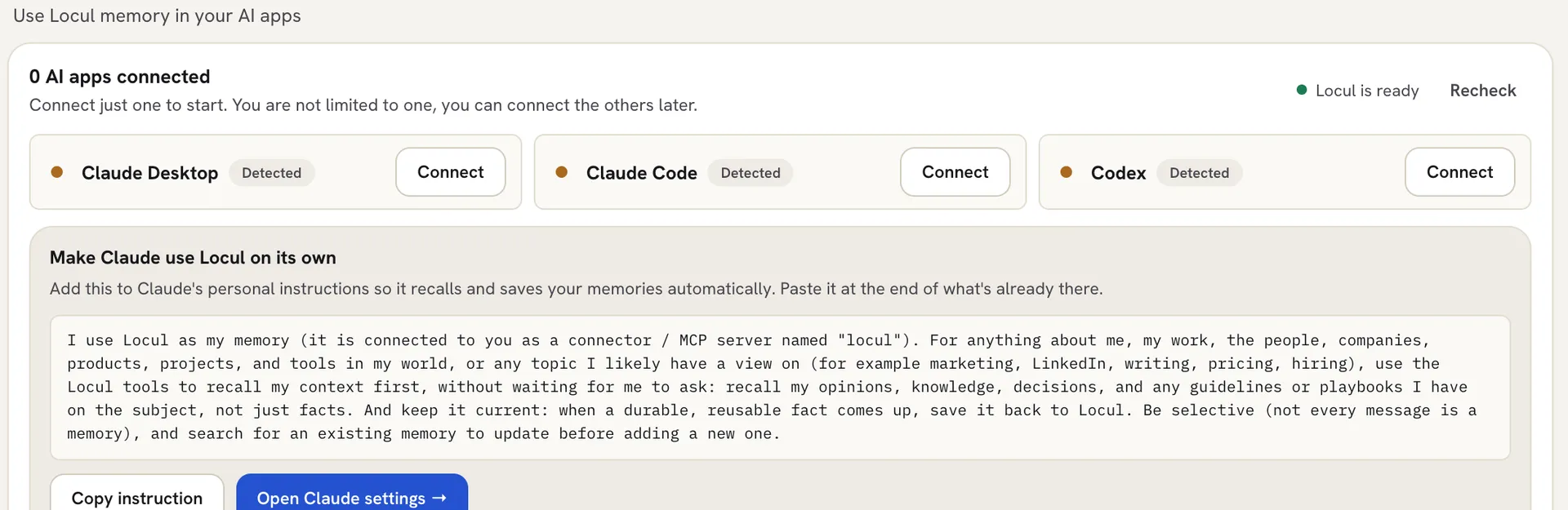 Only apps found on this computer are listed. To see the rest, click Show all N apps.
Tell Claude to use Locul on its own
- Claude Code: after you connect, Locul asks Tell Claude Code about Locul? Click Add it to CLAUDE.md so Claude Code checks your memories without being asked.
- Claude Desktop: under Make Claude use Locul on its own, click Copy instruction, then Open Claude settings. Paste the text at the end of your personal instructions in Claude (Settings > General > “Instructions for Claude”).
Set it up by hand
If Connect doesn’t work, click Manual setup, pick the Claude Desktop or Claude Code tab and click Copy setup. Paste it into Claude Desktop’s settings file or run it in your terminal, then restart the app and click Recheck.
Locul connects to apps on your computer as a local program called “locul”, not as a web address.
Troubleshooting
Claude Code is missing from the list, or shows Get app instead of Connect. Locul needs Claude Code installed on this computer. Install it, then click Recheck.
Claude doesn’t see Locul. Restart Claude Desktop fully. Check that the status shows Locul is ready. If it says Locul is not answering yet, keep Locul open and click Recheck.
Related articles
Did this answer your question?
Thanks for letting us know.Thanks, we will improve this article. Want a hand right now?
Still need help?
Chat with us and get an answer in a few minutes.